
Product map and terminology
Learn where first-release features live, which permissions reveal them, and how WanAware records fit together.
The left navigation shows only the areas included in your company's subscription and allowed by your active Role. Opening a direct URL does not bypass those checks.
Throughout this knowledge base, capitalized words such as Asset, Asset Type, Structure, Element, Discovery, and Inventory are WanAware product labels or record types. Lowercase words are generic. Permission names remain lowercase because they match their IAM identifiers.
Navigation and permission map
Permissions are written as action resource. When a row lists more than one permission, your Role needs all of them for the area to appear and open successfully.
| Area | What you use it for | Portal path | Permission that makes it visible |
|---|---|---|---|
| Launchpad | Review workspace summaries and move into a detailed workflow. | /launchpad | read my_launchpad |
| Functions | Open the first-release operational areas listed below. | No page of its own | No direct permission; the container appears when at least one child area is visible. |
| Functions → Structures | Model an organizational or logical hierarchy. | /structures | read structures |
| Functions → Assets | Review Discovery and Inventory, edit Asset details, and explore Relationships. | /assets/inventory | read assets |
| Functions → Elements | Manage Applications, Services, Sites, and their Collections. | /elements | read elements |
| Administration | Open the company-management areas listed below. | No page of its own | No direct permission; the container appears when at least one child area is visible. |
| Administration → General | Manage permitted company settings. | /administration/general/company | view general and view company_information |
| Administration → Integrations | Connect supported data sources and refresh imported data. | /administration/integrations | read integrations |
| Administration → IAM | Invite members and assign Roles. | /administration/iam | read users — the resource is named users, not iam. |
| Administration → Asset Types | Define custom Asset schemas and their lifecycle. | /administration/asset-types | read asset_types_builder |
| Administration → Service Catalog | Manage approved catalog data for custom Asset Types. | /administration/service-catalog | read service_catalog |
| Administration → Billing | Review plans, usage, payment settings, and billing history. | /administration/billing | read billing, read billing_history, read my_subscriptions, and read payment_methods |
| My Profile | Manage your profile and security settings. | /profile/general | view my_profile |
| Theme Settings | Choose your personal Light or Dark appearance and an available preset. | Top-bar drawer; no page URL | Available to a signed-in user; there is no separate feature permission. |
| Support | Open the in-product Support area. | /support | view support |
The navigation requirement controls entry to an area. Create, update, delete, publish, attach, and other actions can require additional permissions. If a page or action is missing, use A page or action is missing.
How the records fit together
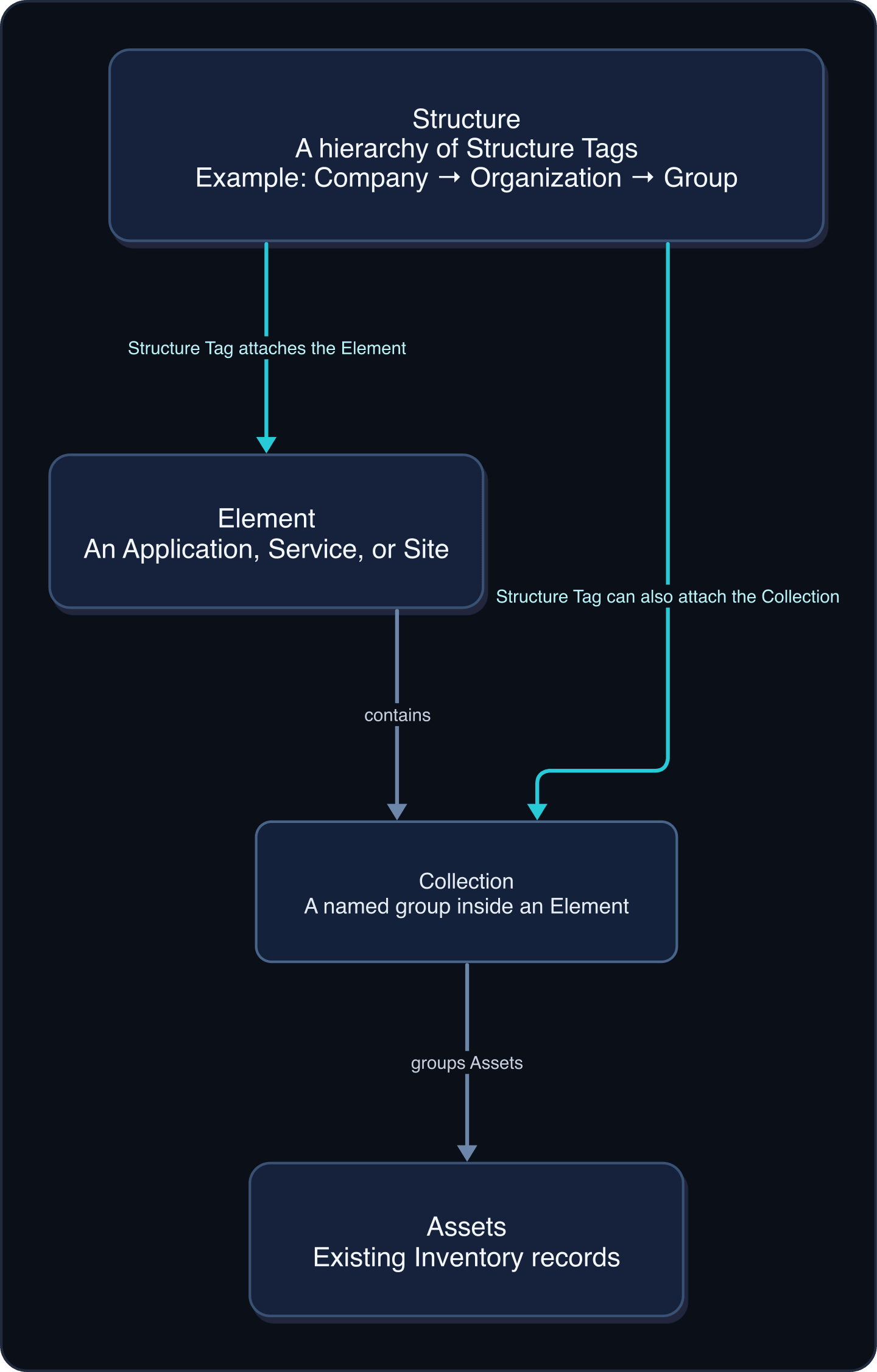
An Asset can arrive from an Integration or a bulk upload. A Collection groups existing Assets inside an Element. A Structure Tag attaches an Element, Collection, or other supported record to the Structure hierarchy; matching names alone do not create that attachment.
These sound alike
| If you are trying to... | Use | Do not confuse it with |
|---|---|---|
| Build a company, organizational, group, or vendor hierarchy | Structure | An Element, which represents an operational unit |
| Represent an Application, Service, or Site | Element | A Structure, which provides hierarchy |
| Represent a location and manage Site Assets or Location details | A Site Element | A Collection, which groups Assets for a purpose |
| Group existing Assets inside an Element | Collection | A Structure, which does not contain Assets directly |
| Review Assets that were found and may still need attention | Discovery | Inventory, the maintained Asset set |
| Work with the maintained Asset set | Inventory | Discovery, the review workspace |
| Define the sections, fields, and dependencies for a kind of Asset | Asset Type | Service Catalog, which supplies managed choices |
| Manage approved manufacturers, models, software, attributes, or compatibility | Service Catalog | Asset Type, which defines the schema |
| Attach a supported record to the organizational hierarchy | Structure Tag | Data Tag, which labels data without placing it in the hierarchy |
| Give members a reusable bundle of access | Role | A Permission, which allows one action on one resource |
| Inspect how one Asset is connected to another | Relationship Graph | A Collection or Structure Tag, which organizes records but does not create an arbitrary Relationship |
Core terms
Integration
A managed connection between WanAware and a supported data source. Each provider can have its own adapter instructions.
- Where: Administration → Integrations (
/administration/integrations) - See also: About integrations
Asset
A resource tracked by WanAware. An Asset has an Asset Type, status, details, tags, and Relationships.
- Where: Functions → Assets → Inventory (
/assets/inventory) - See also: Find, filter, and inspect Assets
Discovery
The workspace for Assets that have been found or are still being reviewed.
- Where: Functions → Assets → Discovery (
/assets/discovery) - See also: Find, filter, and inspect Assets
Inventory
The maintained set of Assets used throughout WanAware.
- Where: Functions → Assets → Inventory (
/assets/inventory) - See also: Verify imported Inventory
Asset Type
The schema that defines an Asset's sections, fields, dependencies, and catalog support.
- Where: Administration → Asset Types (
/administration/asset-types) - See also: Understand Asset Types and Service Catalogs
Service Catalog
Managed information used by an Asset Type, including manufacturers, models, modules, software, specifications, attributes, and compatibility where supported.
- Where: Administration → Service Catalog (
/administration/service-catalog) - See also: Create a custom Service Catalog
Relationship
A connection derived from supported data or created by a specific product flow. WanAware does not provide a general-purpose action for drawing arbitrary Relationships.
- Where: Functions → Assets → [Asset] → Relationship Graph (
/assets/{assetId}/summary/relationship-graph) - See also: View Asset Relationships
Structure
A hierarchy made from supported Structure types such as Company, Organization, Group, and Vendor.
- Where: Functions → Structures (
/structures) - See also: Create and manage Structures
Structure Tag
An attachment to a Structure node. Structure Tags connect supported records, including Elements and Collections, to the hierarchy.
- Where: The details for a supported Asset, Element, or Collection; there is no separate Structure Tag page.
- See also: Manage Data Tags and Structure Tags
Data Tag
A label used to classify or filter supported records without attaching them to the Structure hierarchy.
- Where: The details for a supported Asset, Element, or Collection; there is no separate Data Tag page.
- See also: Manage Data Tags and Structure Tags
Element
An Application, Service, or Site used to represent an operational unit.
- Where: Functions → Elements (
/elements) - See also: Create and populate Elements
Site
A location-oriented type of Element. A Site can include supported Site Assets and Location details.
- Where: Functions → Elements → [Site] (
/elements/{elementId}/site-assets) - See also: Manage Site details
Collection
A named group of existing Assets inside an Element.
- Where: Functions → Elements → [Element] → Collections (
/elements/{elementId}/collections) - See also: Create Collections and add Assets
Role
A named set of Permissions assigned to members. A Role controls which pages and actions a member can use.
- Where: Administration → IAM → Roles (
/administration/iam/roles) - See also: Understand Roles and Permissions
Permission
An allowed action on a resource, such as read assets. Permissions are collected into Roles rather than assigned as navigation labels.
- Where: Administration → IAM → Roles → [Role] (
/administration/iam/roles/{roleKey}) - See also: A page or action is missing
Learn and continue
- Learn: Use this page as the glossary and navigation map for the first release.
- In WanAware: Start with Choose your path.
Get help
Email [email protected] with your company, affected user, page URL, timestamp and time zone, and a screenshot with sensitive details removed. Never send passwords, credentials, tokens, or secret values.
Updated about 2 months ago