
Attach Elements to Structures
Add or remove Structure Tags from an Element and verify its hierarchy attachment.
Outcome: Attach an Element to the intended Structure node with a Structure Tag.
For: Customer administrators and engineers
Permission: update elements
Time: 3–5 minutes
Changes made: Changes a shared hierarchy attachment
If you're stuck
- Confirm you are editing the Element, not the Structure hierarchy.
- Search Structure Tags by the exact node name and verify its parent path.
- Do not create another Structure because the expected tag is missing.
Before you start
- Confirm the Structure node exists and has the right type and parent.
- Confirm the Element's name, type, and ID.
- Check current Structure Tags to avoid a duplicate or conflicting attachment.
Field and option guide
| UI item | Meaning | Safe use |
|---|---|---|
| Structure Tags | Existing Structure nodes attachable to the Element | Select the exact node by name and hierarchy path |
| Selected tag | Current attachment | Clear only the tag that should be detached |
| Unsaved-change bar | Attachment has not been stored | Save before leaving the Element |
Attach or detach the Element
- Open Functions → Elements and select the Element.
- Find Structure Tags in the Element details.
- Search for the intended Structure node.
- Select the tag to attach the Element, or clear the tag to detach the Element.
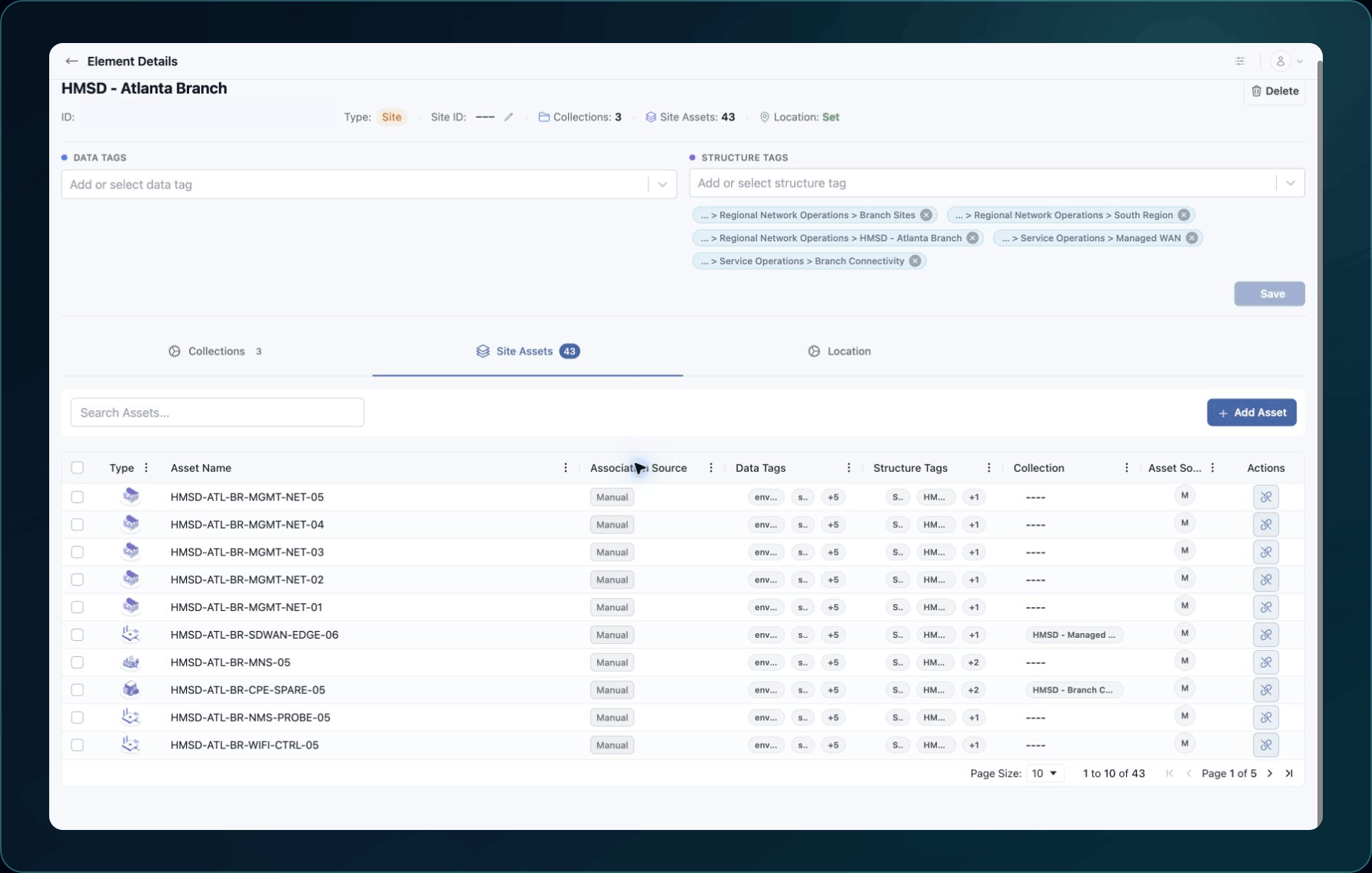
5. If the unsaved-change bar appears, use its save action before leaving.
Expected result: The intended Structure Tag remains selected after refresh.
If the tag is missing, verify the Structure and your relationship permission. Do not create a second Structure with a similar name.
Check your result
Refresh the Element and confirm the selected Structure Tag. Open Structures, expand the intended node, and verify the Element appears in the supported view.
Undo this change
To detach the Element, clear the Structure Tag and save. To restore the attachment, reapply the tag and repeat the verification.
Detaching an Element does not delete the Element or the Structure.
Learn and continue
- Learn: Understand Structures, Elements, and Collections
- In WanAware: Open Functions → Elements (
/elements) and select the intended Element.
Next steps
Get help
Email [email protected] with your company, affected user, Element ID, Structure Tag name or ID, page URL, timestamp and time zone, and expected versus actual result. Never send passwords, credentials, tokens, or secret values.
Updated about 2 months ago