
Amazon Web Services integration adapter
Prepare the current AWS account inventory connection without using access keys.
Outcome: Authorize WanAware to collect supported AWS account inventory through the released role-based setup.
For: WanAware customer administrators and AWS account administrators
Permission: read integrations and create integrations in WanAware, plus authority to deploy the generated stack in the AWS account
Time: About 10–20 minutes, plus stack deployment time
Changes made: Saves an AWS connection in WanAware and creates provider-side resources through CloudFormation
If you're stuck
- Use the exact 12-digit account ID from the intended AWS account.
- Generate the setup from WanAware; do not substitute long-lived access keys.
- If Test connection fails, compare the Role ARN and stack status before deploying another stack.
Before you start
- Get approval from the AWS account owner.
- Confirm the 12-digit account ID without including it in screenshots or support messages unless sanitized.
- Use the released generated stack; do not substitute long-lived access keys.
- Review the stack's permissions before deployment.
Field and action guide
| UI item | Purpose | Required value or result | Source |
|---|---|---|---|
| Account name | Identifies the connection in WanAware | Unique, recognizable name with no credential data | Your naming standard |
| AWS account ID | Selects the source account | Exactly 12 digits | AWS account administration |
| Generate AWS setup | Creates the released CloudFormation setup | Open only in the intended account and Region | WanAware setup page |
| Role ARN | Identifies the deployed access role | Exact ARN created by the approved stack | CloudFormation output |
| Test connection | Checks the saved role access | AWS connection verified | WanAware after save |
| Run inventory crawl | Starts inventory collection | crawl request submitted | Saved integration action |
| Delete integration… | Removes the saved WanAware connection | Use only after impact and source-stack review | Integration action menu |
Complete the adapter fields
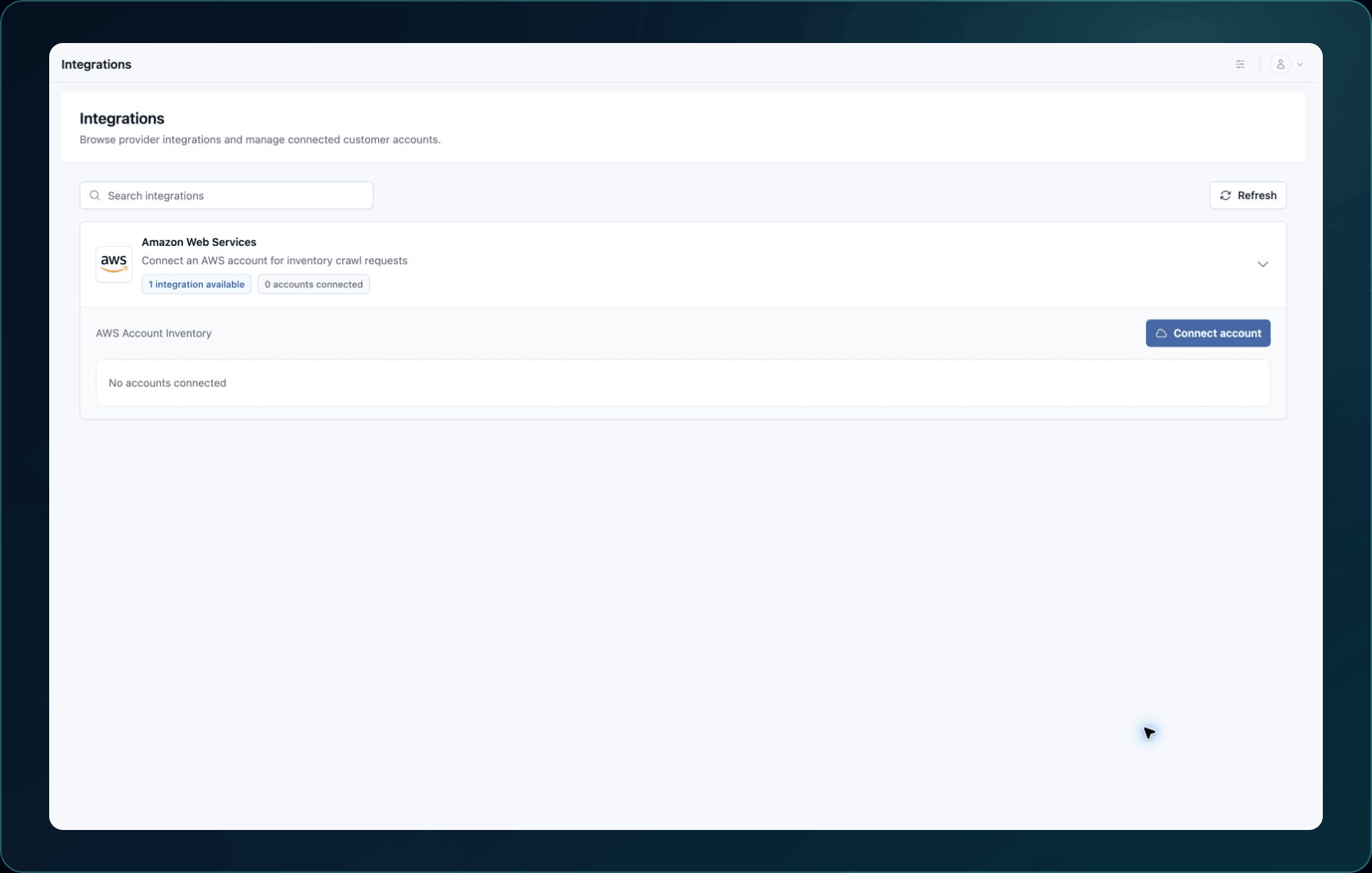
- Open Administration → Integrations.
- Expand Amazon Web Services.
- For AWS Account Inventory, select Connect account.
4. Enter a recognizable account name and the 12-digit AWS account ID.
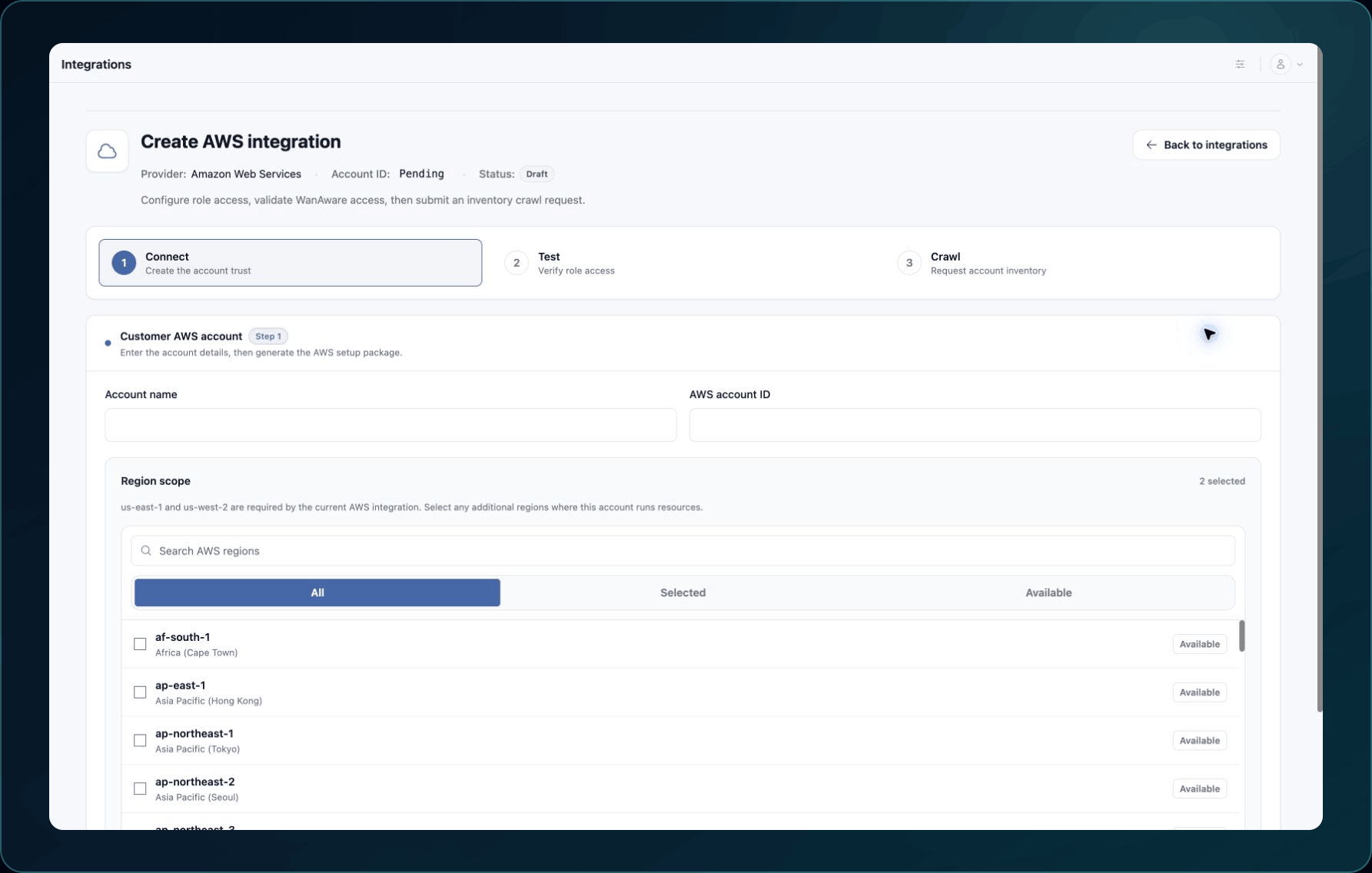
- Select Generate AWS setup.
- Open the generated CloudFormation setup and review it in the intended AWS account and Region.
- Deploy the stack after the account owner approves it.
- Return to WanAware and confirm that the Role ARN matches the created role.
- Save the integration.
Expected result: The account appears on the integration card with a connected status.
If the stack or role does not match, stop before repeating deployment. Record the stack status and exact error, without copying credential values.
Test and collect
- Select Test connection.
- Wait for a successful connection result.
- Select Run inventory crawl.
- Wait for the request confirmation, then verify a known record in Assets → Inventory.
Check your result
Open one imported asset and confirm its AWS account context and source identifier match the intended account.
Undo this change
Removing the WanAware connection does not automatically delete the CloudFormation stack. Coordinate these as separate actions:
- Confirm that no one still needs the collected inventory.
- Select Delete integration…, read Delete this AWS integration? This removes the saved account connection., and confirm only after approval.
- Ask the AWS account owner to review and delete the stack if it is no longer required.
Learn and continue
- Learn: About integrations
- In WanAware: Open
/administration/integrationsin your WanAware workspace.
Next steps
Get help
Email [email protected] with your company, affected user, sanitized integration identifier, failed stage, stack status, page URL, timestamp and time zone, and exact error. Never send an account credential, access key, token, role secret, external ID, or private key.
Updated about 2 months ago